Syncshells
Syncshells connect many Snowcloak users without requiring every member to exchange direct-pair codes. They're useful for friend groups, venues, FCs, event communities, long-term RP groups, or just plain shared interests.
Joining by code
For a regular syncshell, you'll need two things - the GID/Alias, and the password.
Open the main Snowcloak window and select Syncshells.
- Enter the syncshell GID or alias.
- Select the add button.
- Read and accept the joining notice.
- Enter the password.
- Select Join.
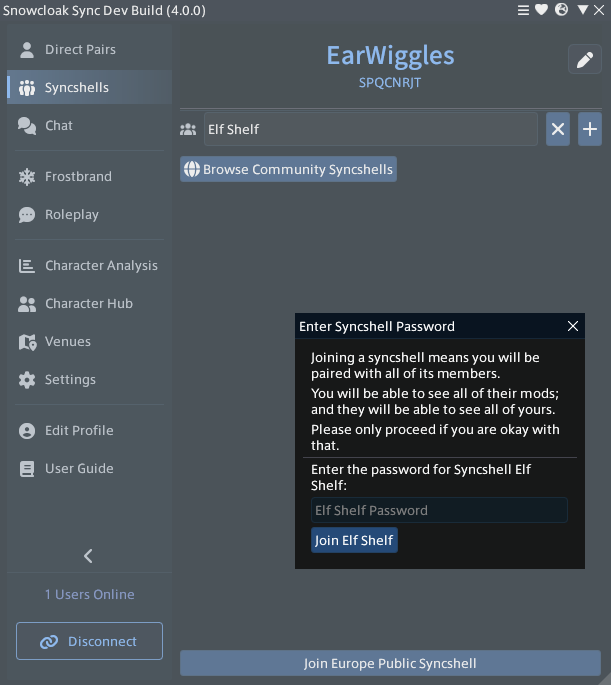
Joining can fail if the code or password is wrong, the syncshell is full, invitations are disabled, or your access has been restricted.
The community directory
The community directory is for syncshells that are accepting members from the public.
Select the directory button in the Syncshells page to browse approved community listings.
Listings can include a description, tags, main region, optional main world, and one of three join policies:
- Open — eligible users can join directly.
- Request — access is subject to administrator approval. The current directory identifies these listings but does not submit the request for you, so contact an administrator.
- Invite only — the listing can be discovered, but membership still requires an invitation or the password from its owner. This is usually for community shells that are temporarily closed for overhauls or moderation.
Public RP events can also have a direct Join syncshell action. This does not use the password, but normal capacity, blocking, Adult-content, and invitation settings still apply.
Regional syncshells
Snowcloak offers official regional syncshells based on your home datacentre region. Use the regional join control in the Syncshells page.
Regional and other public syncshells have chat muted or disabled by default. Their member limit is tied to server capacity - the more servers Snowcloak can afford to operate, the more members these shells can have.
Creating a syncshell
Leave the GID/alias field empty and select the plus button, then confirm Create Syncshell.
The creator becomes the owner. Open the syncshell's menu and select its administration panel to set it up.
Everyday controls
A syncshell row provides controls for:
- pausing or resuming syncing for the entire shell;
- copying its GID;
- changing your local notes;
- viewing upcoming and active events;
- setting your sound, animation, and VFX allowances;
- leaving the syncshell by holding Ctrl while selecting Leave.
Owners must transfer ownership before leaving.
Right-click members in the syncshell or chat member list for profile, note, pair, permission, and moderation actions available to your role.
Syncshell chat
Syncshell chats appear in the Chat window.
Sending messages can be done from the dedicated window, or by using /snow <conversation number> <message> from the game's chat box.
The conversation number is shown in the Snowcloak chat sidebar.
Use Settings > Chat to:
- enable or disable Snowcloak chat;
- automatically mute newly joined syncshell chats;
- mute individual conversations;
- choose a sound per conversation;
- mirror messages into the FFXIV chat log.
Appearance permissions
Your per-syncshell settings can disable:
- all appearance syncing by pausing the shell;
- sounds;
- animations;
- VFX.
Shell-wide restrictions set by administrators take precedence over an individual member's more permissive setting.
Administration
Owners and moderators use the syncshell administration window for member management and community features.
Depending on role, the window includes:
- password and invitation settings;
- member roles, removal, and bans;
- syncshell-wide appearance permissions;
- member labels;
- message of the day;
- community-directory listing;
- events and Discord digest.
The owner can promote or remove moderators. Moderators cannot moderate the owner or another role above their own.
Community listing
In the administration window, open Community > Directory listing.
Choose whether the shell is listed, its join policy, description, tags, main region, and optional main world. A region is required for a public listing.
Events
Owners and moderators can schedule one-off or recurring events with locations, hosts, tags, warnings, capacity, reminders, ratings, and banners.
Publishing an event to the public RP directory makes the hosting syncshell joinable to eligible viewers without its password. See Roleplay events.
Venue syncshells
A registered housing venue can use a syncshell for temporary visitor membership. Visitors receive a prompt when they enter the plot and are removed after leaving the grounds for long enough.
Registration, listings, advertisements, and reminders are covered in Venues and venue events.