BBCode
Make your profiles fancy.
About BBCode
BBCode is a syntax format that allows adding flair to text. Used on forums, it allows a bit more customisation than the markdown you're used to on Discord and similar. We don't use "pure" BBCode, having made a few modifications to better provide what we think is useful, and to stay within the limitations of the UI system.
If you want to experiment with BBCode without ruining your profile or plot plate, you can use the command /snow bbtest
to open a testing window to try out the below. It's preloaded with everything we support, so you can learn by doing if
you don't fancy reading through a tutorial.
Syntax
BBCode syntax is used in a [tag]text[/tag] style. Square brackets containing the tag to use, the content, then square brackets with a slash to close it, similar to HTML. Examples are provided below, with example code followed by a demonstration screenshot.
Text Colouring
Text colouring uses standard RGB hex codes. [color=#ff6699]This is some coloured text![/color]

Font Size
Font size can be achieved in two ways: percentage value, and absolute value. The maximum size is capped for sanity reasons.
[size=250%]This is big text.[/size] [size=12]This is smaller text.[/size]

It's worth noting that tags can be nested:
[size=250%]This is [color=#ff6699]big[/color] text.[/size] [size=12]This is [color=#9966ff]smaller[/color] text.[/size]

Emoji
Most of the emoji you're familiar with from Discord can be used, in the same style as Discord - enclose the "code" within colons.
We've taken the liberty of adding :at_left: and :at_right: options for your memeing pleasure.
Text Alignment
Text can be aligned to the center or right-hand side of the message box.
:at_left:Elezen:at_right:
[center]Centered line[/center]
[align=right]Right aligned line[/align]

Images
Images can be embedded. Note: Users have an option to disable image loading. No preview is shown for this, but the syntax is simple - the below will give a centred image.
[center][img]https://some.url/image.file[/img][/center]
Lists
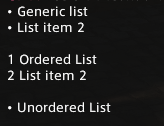
Lists are available in both ordered and unordered varieties. It's recommended to put the first list item on the same line as the opening tag.
[list][*]Generic list
[*]List item 2
[/list]
[ol][*]Ordered List
[*]List item 2
[/ol]
[ul][*]Unordered List
[/ul]