Penumbra Basics
Penumbra - the mod loader of choice.
Getting started
In modern times, mod files for XIV come in two forms - PMP files, and TTMP2 files. Penumbra is capable of importing them both.
This guide will walk you through setting up your first outfit, and the next section will show you how to set up a Glamourer preset with it. These two sections are all you need for basic modding - but we'll have an advanced section for the optional mods Snowcloak can use, as well as more advanced topics.
Choosing your mods
Many character mods require a base body (NSFW Link).
Choosing one is up to you, based on your personal taste. Many bodies provide compatibility with other bodies texture-wise, for the sake of outfits, though some don't. At this stage, just pick whichever one tickles your fancy. This guide will be using Rue+.
You should also choose an outfit at this point - A safe bet is anything compatible with YAB, though if the outfit has a custom version available for your body, even better.
Download the files, and extract it somewhere you can find it. Type /penumbra in chat, and open the "Collections" tab.
The Default Collection
The default collection in Penumbra is pre-made - though we're going to modify it a bit.
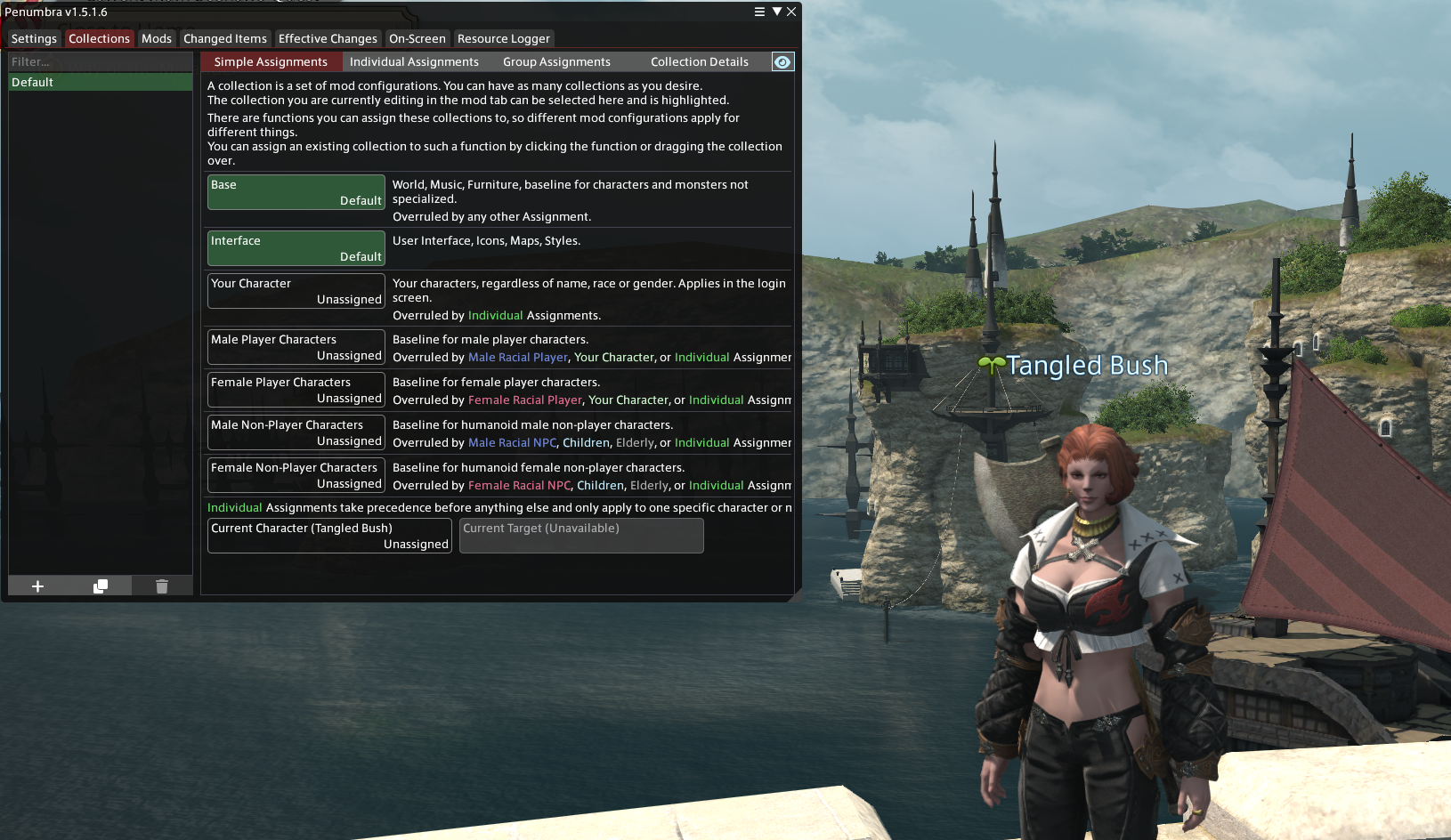
We can see here that the default collection applies to "Base". This means your mods will override every other character you don't sync with. You may or may not want this - for the purposes of this guide, we're turning this off so that NPCs and players appear as they usually do. Click on "base", and select "Use no mods". Then, at the bottom, click "Current character", and select "Use Default". This collection is now applying to your character!
You can create other collections easily - for example, if you use multiple characters, you can make one for each and have it automatically apply modsets to them.
Installing the body
Switch to the "mods" tab, and at the bottom, click the "import mod" button - second on the left. Navigate to where you saved the mod, and double click the .pmp/.ttmp2 file. It'll now import the mod - be patient!
By default, the mod won't be enabled - click on it, then tick the "enabled" box. Ignore priority for now - we come to that next.
Change any settings you want to change. On the "changed items" tab, scroll down - most bodies adjust either smallclothes, the Emperor's New Set, or both. Smallclothes replacements are usually SFW, while Emperor's replacements are nude. You can right click replacement entries to apply it to your character if you want to admire yourself for a moment.
Installing the clothes
Once you've found an outfit you like, the process above is basically the same, with one exception - here, we're going to adjust the priority.
While not strictly necessary for most outfits, some outfits build on others - for example, an outfit built for YAB might be "ported" to another body, and require the original mod installed to provide textures. Here, the mods will conflict with each other, rendering it necessary to change the priorities. We'll use a bikini as an example.
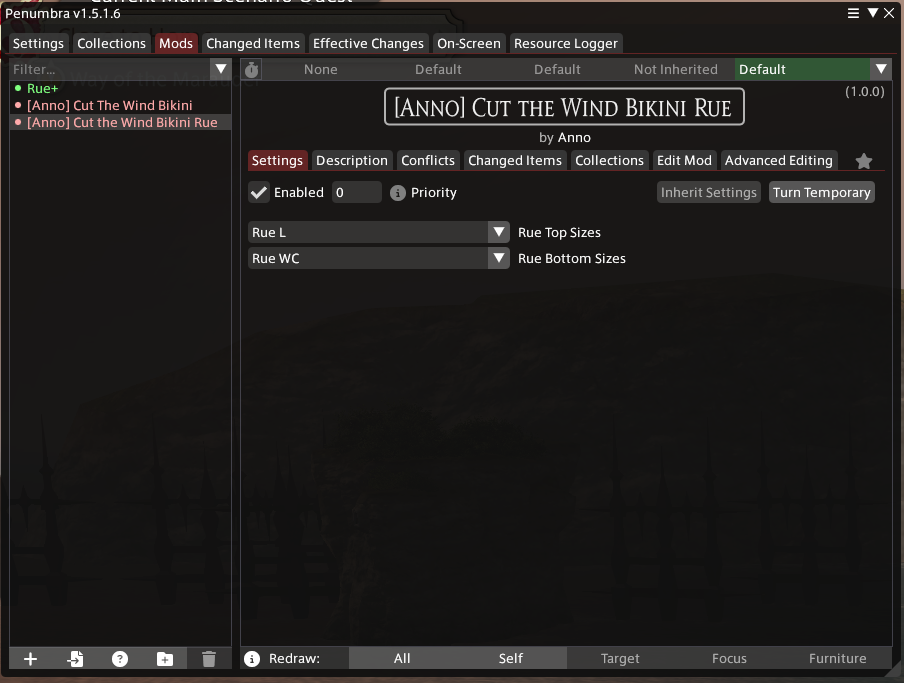
Mods highlighted in red have conflicts with other loaded mods. We can see from the names that we have a base mod, and a modded mod - the base mod provides files the other mod relies on, so should have the higher priority. Priority 0 is the lowest - some people like to have body mods as priority 0 and clothes as priority 1. In that case, the base clothes should be priority 1, and anything based on those clothes as priority 2. Priority 2 overrides priority 1, which overrides priority 0, etc.
Here, we change the Rue port of the bikini to priority 1, and apply the clothing items in the Changed Items tab.

We can see that our conflict is resolved, and we're wearing a nice, shiny bikini now.
Congrats! Anyone you're synced with will now see you're ready to hit the beach, or whatever other occasion your outfit prepared you for.
Different mods will change different items. You don't need to own these items thanks to the magic of Glamourer, which we discuss in the next section. Mods will conflict with other mods if they change the same item, so pay attention to priorities!