Your first sync
Let's make some friends.
The main window
Most Snowcloak functions will be done in the main window. To bring this up, you can click either the icon in the top-left
of your game, near the name of the server you're on, or type /sync or /snow in chat.
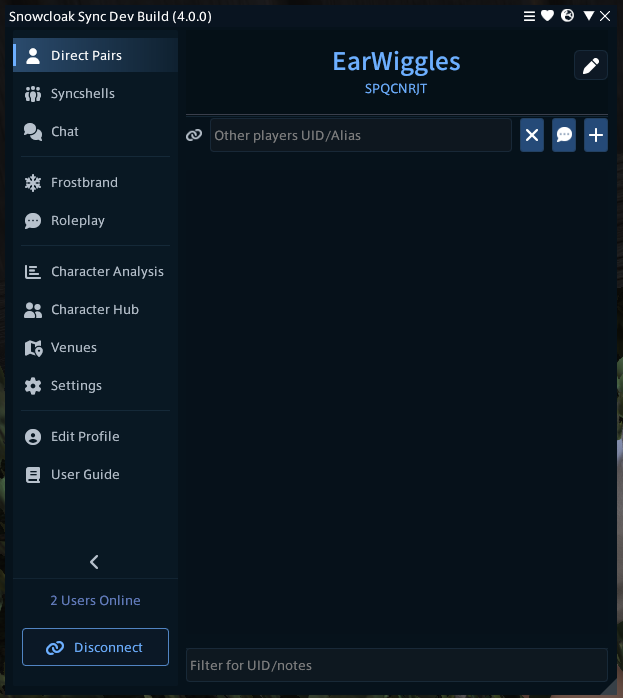
From here, you can see all of your options. The blue string of text is your user ID - if you have a vanity ID, this'll be displayed instead with your "internal" ID shown below in smaller text.
Your ID
The term used for players you're syncing with one-on-one is "pairs". Pairing requires consent from both sides - a mutual exchange of codes is required.
You can see your code at the top of the main window. While optional, you might want to take this opportunity to set a vanity ID. Vanity IDs are free, and act as an alias to your main code - they're much easier to remember, and serve exactly the same purpose.
In the window above, the vanity ID is set to EarWiggles, while the "main" code is below it.
When giving your code to people to sync with you, you can give them either the vanity code or the plain UID. Note that your chosen vanity ID will automatically propagate to people you're synced with.
To set one, click the pencil icon. You'll notice that this window has a Patreon login option - this is not required for vanity IDs (those are free!) but for those who help pay the server bill, or have done something cool in the community, you can also set vanity colours which will apply to your character's name in the overworld, in-game chat, and in the pair list.
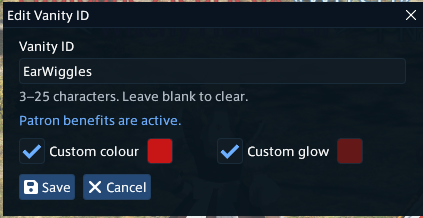
Click save to save these, then start hunting for your first pair!
Pairing Basics
This section assumes you're making a direct pair. For Snowcloak's nearby pair-finding service, see Frostbrand. For group syncs, see Syncshells.
Once you've gotten friendly with each other and decided to pair up, send each other your codes. You can copy your code by clicking it in the main window. Once you have their code or vanity ID, enter it into the textbox.
On pressing the plus icon next to the textbox, you'll be greeted with a small text entry window. You can write a note here if you'd like. If you choose not to, by default, the client will automatically apply a note with the name of the first character you see with that code. Notes are shown in the pair list instead of their UID, giving you an easy way of identifying someone later.
If the other person hasn't added you yet, you'll see them showing as "unpaired". Once paired, their status will change to either "visible" or "online", depending on whether they're in your client's draw distance.
There's no limit on how many people you can pair with. However, the official advice is - and always will be - to only pair with people you trust. When paired, you will see the other person's mods unless one of you pauses the other. If you happen to run past them in an alleyway on your way to do retainer things, you will be able to see what they're up to and what they have loaded - which may be different from what they had with you. Bear this in mind.
Pausing
If you need to pause someone for whatever reason - be it because they have a mod on you're not a fan of, they're making your game slow because their mods are heavy, or you're testing things out and don't want anyone to see - hit the pause button next to their name. This will disable syncing with that person until you unpause them.
Pausing also works in syncshells. Let's talk about them next.
For notes, sound/animation/VFX restrictions, local appearance block lists, and troubleshooting, continue with Pairs, notes, and permissions.